

You rely on a home EV charger to keep daily driving practical and reduce time spent at public charging stations. Choosing the right ChargePoint Home Flex configuration matters because the vehicle connector, wall connection, circuit capacity, and installation type all affect compatibility and charging speed.
This guide compares the main J1772 and NACS Home Flex options so you can choose a charger that matches your vehicle, electrical panel, existing outlet, and long-term plans.
This roundup is reader-supported. When you purchase through qualifying links, we may earn a referral commission at no extra cost to you.
Quick Verdict
Choose a J1772 version if your vehicle has a J1772 AC charging inlet. Choose a NACS version if your vehicle accepts NACS home charging without an adapter. A plug-in Home Flex can provide up to 40A on a suitable 50A circuit, while a properly installed hardwired model can provide up to 50A when the vehicle and electrical system support it.
Compatibility and Installation Notice
Check your vehicle’s actual AC charging inlet before ordering. Connector adoption varies by manufacturer, market, and model year. You should also have a licensed electrician verify the dedicated circuit, outlet, breaker, panel capacity, wiring, mounting location, and local permit requirements. A plug-in charger is not a substitute for a properly installed EV charging circuit.
Top Picks
|
Category |
Product |
Best For |
|---|---|---|
|
🏆 Best Overall Plug-In |
J1772 vehicles and an existing 14-50 outlet |
|
|
🔧 Best Hardwired J1772 |
Permanent installation and higher output potential |
|
|
⚡ Best Hardwired NACS |
NACS vehicles and a permanent installation |
|
|
🔌 Best Plug-In NACS |
NACS vehicles and a 14-50 outlet |
|
|
🔩 Best for a 6-50 Outlet |
Garages with a compatible existing 6-50 receptacle |
How We Picked
You need more than a product name to choose the correct EV charger. We compared the vehicle-side connector, wall connection, installation method, maximum usable charging current, cable reach, app controls, outdoor suitability, and warranty terms.
We also considered common buyer concerns such as panel capacity, installation cost, Wi-Fi reliability, future vehicle compatibility, and whether the charger can use your vehicle’s full onboard AC charging rate. The category labels are practical recommendations, not laboratory scores.
Before You Buy
- Confirm whether your vehicle needs a J1772 or NACS connector.
- Check whether you have a NEMA 14-50 outlet, NEMA 6-50 outlet, or no suitable outlet.
- Ask an electrician how much continuous EV charging load your panel can support.
- Check your vehicle’s maximum onboard AC charging rate.
- Measure the distance from the mounting position to the vehicle’s charging port.
- Confirm Wi-Fi coverage if you want app scheduling and remote information.
- Verify the exact connector and plug shown on the Amazon product selector before ordering.
The Home Flex 14-50 J1772 is the easiest recommendation for a driver who already has a correctly installed 14-50 outlet and a vehicle with a J1772 AC inlet. It can supply up to 40A on a suitable 50A circuit, although your actual charging rate may be lower if the vehicle’s onboard charger accepts less power.
The plug-in format makes the charging unit easier to replace or relocate than a permanently hardwired model. It does not remove the need for a safe dedicated circuit, a suitable receptacle, correct breaker sizing, and professional electrical verification.
Skip it if: Your vehicle has a native NACS inlet and you do not want to use an adapter, or you want more than 40A of charging output.
What Buyers Commonly Mention
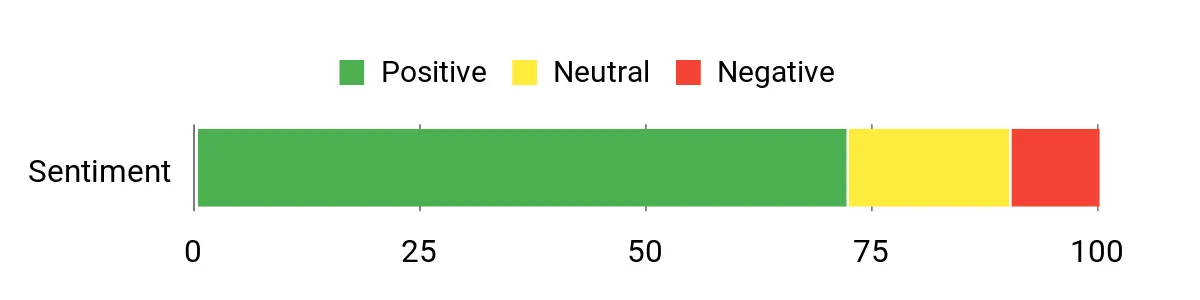
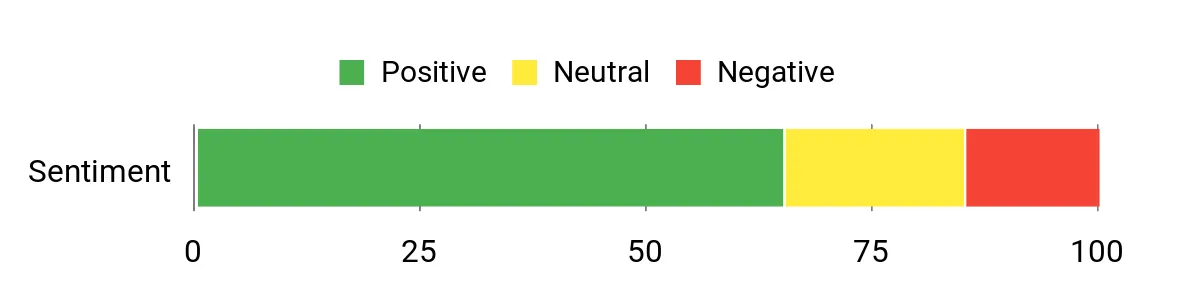
Buyers often like the charging performance, long cable, build quality, and app-based session information. The most common reservations involve Wi-Fi connection problems, app troubleshooting, and the charger’s higher cost compared with simpler non-networked models.
General Review Pattern: Mostly positive, with mixed feedback about Wi-Fi reliability and value.
Ease of Use
|
Feature |
Ease Level |
|---|---|
|
Using an Existing Verified 14-50 Outlet |
Easy |
|
Installing a New Circuit or Outlet |
Professional Installation Required |
|
App Setup and Scheduling |
Usually Easy |
|
Cable Handling |
Moderate |
Energy and Charging Control
The ChargePoint app can schedule charging around your routine or utility rate plan. This may lower charging costs when your utility offers cheaper off-peak rates. Savings and environmental benefits depend on your local tariff and electricity mix.
Key Benefits
- Direct J1772 connection for compatible EVs and plug-in hybrids
- Up to 40A charging on an appropriately installed 50A circuit
- 23-foot cable for flexible vehicle positioning
- Wi-Fi scheduling and session information through the ChargePoint app
- Plug-in design that is easier to replace than a hardwired unit
The hardwired J1772 model is the strongest option in this group for a buyer who wants a permanent installation and the highest output the Home Flex platform can provide. A licensed electrician can configure it for the electrical capacity available at your home.
A hardwired installation removes the plug and receptacle connection, gives the installation a cleaner appearance, and may be preferable where local code requirements make a high-power receptacle less practical. It can also support 48A or 50A charging configurations that are not available from the plug-in versions.
Skip it if: You rent your home, expect to move the charger often, have limited panel capacity, or your vehicle cannot benefit from more than 40A AC charging.
What Buyers Commonly Mention
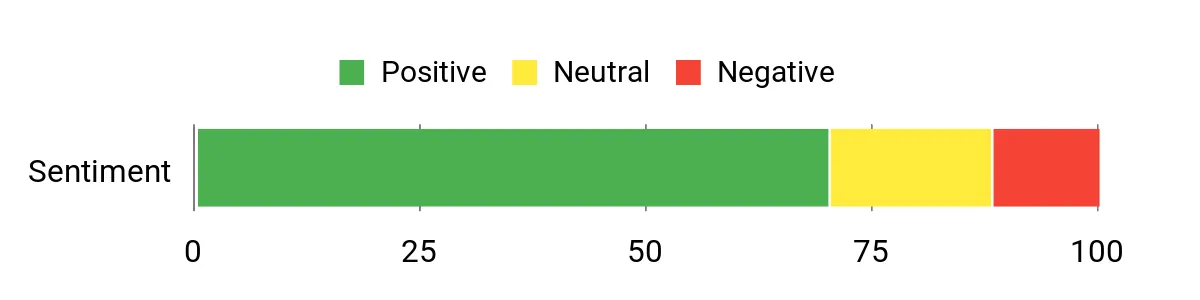
Owners commonly value the permanent appearance, charging consistency, cable quality, and app scheduling. The main buying hesitation is the cost of professional installation, especially when the electrical panel, service, wiring route, or permitting needs additional work.
General Review Pattern: Positive about charging and build quality, with installation cost as the main limitation.
Ease of Use
|
Feature |
Ease Level |
|---|---|
|
Hardwired Installation |
Professional Installation Required |
|
App Setup and Scheduling |
Usually Easy |
|
Daily Charging |
Easy |
|
Future Relocation |
Challenging |
Energy and Charging Control
Adjustable amperage helps the installer match the charger to the approved circuit capacity. App scheduling can also move charging into lower-cost utility periods when a time-of-use plan is available.
Key Benefits
- Direct J1772 connection for compatible vehicles
- Hardwired configuration with output settings up to 50A
- Cleaner permanent installation without a wall plug
- Wi-Fi app controls for schedules and charging information
- Suitable for garages or approved outdoor mounting locations
This version combines the permanent installation advantages of the hardwired Home Flex with a native NACS charging handle. It is a practical choice for a compatible Tesla or another NACS-equipped vehicle when you want to avoid using a J1772 adapter during daily home charging.
The final charging rate depends on your electrical system and the vehicle’s onboard AC charger. A vehicle that accepts less current will not charge faster simply because the Home Flex is configured for a higher output.
Skip it if: Your current vehicle has a J1772 inlet, you plan to change connector types soon, or you need a charger that can be unplugged and moved without electrical work.
What Buyers Commonly Mention
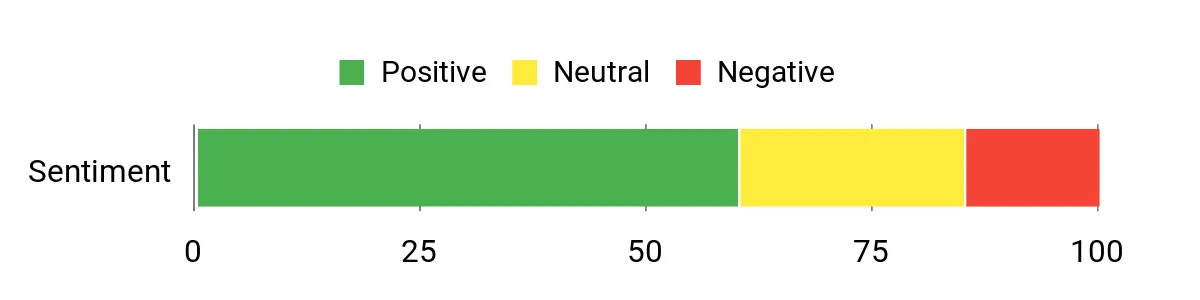
The native NACS handle, permanent wall installation, app scheduling, and lack of a daily adapter are the main attractions. Installation cost, Wi-Fi troubleshooting, and uncertainty about future vehicle connector needs are the main points to consider.
General Review Pattern: Positive for connector convenience and charging performance, with normal smart-charger connectivity concerns.
Ease of Use
|
Feature |
Ease Level |
|---|---|
|
Hardwired Installation |
Professional Installation Required |
|
Native NACS Connection |
Easy |
|
App Setup and Scheduling |
Usually Easy |
|
Relocating the Charger |
Challenging |
Energy and Charging Control
You can use app schedules to align charging with your utility plan. Lower charging costs are possible when your electricity provider offers reduced off-peak rates.
Key Benefits
- Native NACS connector for compatible vehicles
- No J1772 adapter needed for routine NACS home charging
- Hardwired installation with output settings up to 50A
- App scheduling and charging-session information
- Permanent indoor or approved outdoor mounting
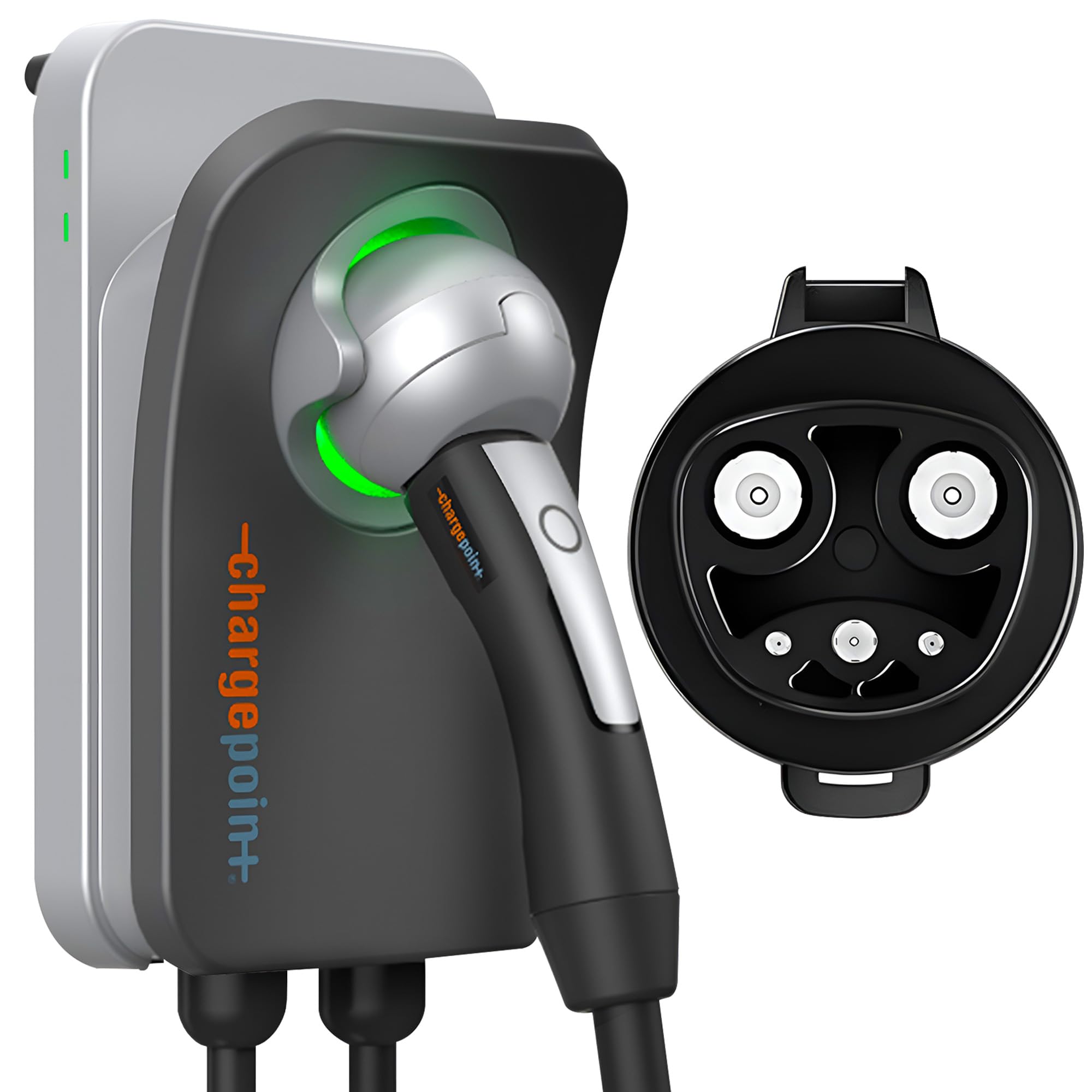
The Home Flex 14-50 NACS combines a native NACS charging handle with the convenience of a removable plug-in unit. It can supply up to 40A from a suitable 50A circuit, subject to the vehicle’s onboard charging limit.
This version makes sense when your garage already has the correct 14-50 receptacle and you prefer not to hardwire the charging unit. Have the outlet and circuit inspected before relying on them for long-duration EV charging, especially if the receptacle was originally installed for another appliance.
Skip it if: You need more than 40A, have a J1772 vehicle without a suitable adapter, or do not already have the correct dedicated electrical circuit.
What Buyers Commonly Mention
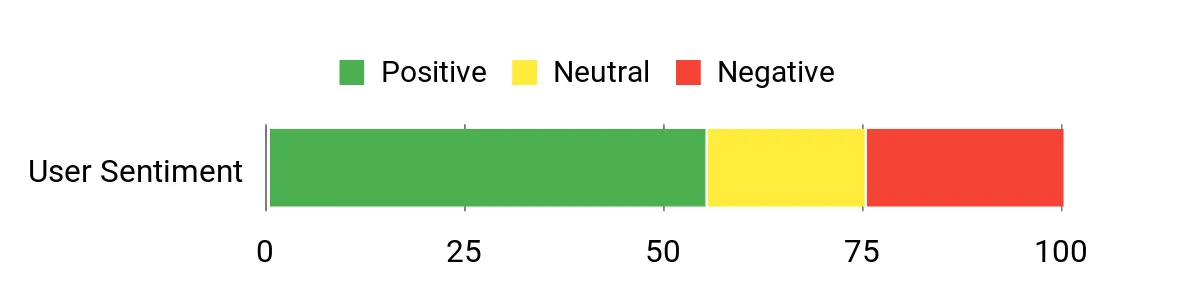
Buyers are attracted to the native NACS handle, plug-in format, cable reach, and app scheduling. Reported concerns include Wi-Fi setup, occasional hardware problems, and the need to confirm that the selected Amazon variant has the correct plug and connector.
General Review Pattern: Mixed-to-positive, with convenience as the main strength.
Ease of Use
|
Feature |
Ease Level |
|---|---|
|
Using an Existing Verified 14-50 Outlet |
Easy |
|
Installing a New Circuit or Outlet |
Professional Installation Required |
|
Native NACS Connection |
Easy |
|
Wi-Fi Troubleshooting |
Moderate |
Energy and Charging Control
App scheduling can help you charge during lower-rate periods when your utility offers time-of-use pricing. Check whether the vehicle also has its own charging schedule so the two systems do not conflict.
Key Benefits
- Native NACS connection for compatible vehicles
- Up to 40A charging on a suitable 50A circuit
- Plug-in design that is easier to replace or relocate
- Wi-Fi scheduling and charging information
- Indoor or properly configured outdoor installation options
The main reason to choose the 6-50 version is simple: your garage already has the correct NEMA 6-50 receptacle. Its charging performance is similar to the 14-50 plug-in version, with up to 40A available from a suitable 50A circuit.
Do not choose a 6-50 model merely because the charger price looks lower. Installing a new 6-50 outlet may remove any savings, and the outlet must match the exact plug supplied with the charger. Amazon variant names and selectors can change, so verify both the wall plug and vehicle connector before checkout.
Skip it if: You have a 14-50 outlet, need a hardwired installation, cannot confirm the vehicle connector, or would need to install a new receptacle solely for this model.
What Buyers Commonly Mention
The 6-50 configuration appeals to buyers who can reuse an existing compatible circuit. The key concern is ordering accuracy because the wall plug and vehicle connector must both match your setup.
General Review Pattern: Positive when it matches an existing outlet, but configuration verification is essential.
Ease of Use
|
Feature |
Ease Level |
|---|---|
|
Using an Existing Verified 6-50 Outlet |
Easy |
|
Installing a New Circuit or Outlet |
Professional Installation Required |
|
Confirming the Amazon Variant |
Requires Care |
|
App Setup and Scheduling |
Usually Easy |
Energy and Charging Control
Like the other Home Flex plug-in models, this version can use app schedules to target off-peak periods. Any cost reduction depends on the rate structure offered by your electricity provider.
Key Benefits
- Matches a compatible NEMA 6-50 wall receptacle
- Up to 40A charging on a suitable 50A circuit
- Plug-in construction for easier future replacement
- Wi-Fi scheduling and charging-session information
- Useful alternative when a correctly installed 6-50 outlet already exists
Check Product Details on Amazon
FAQ
Which ChargePoint Home Flex Connector Fits My Car?
Check the AC charging inlet on your exact vehicle, not only the manufacturer name. Choose J1772 when your vehicle accepts a J1772 home-charging connector. Choose NACS when it has a native NACS inlet and you want to charge without an adapter.
Connector type can vary between model years, trim levels, and markets. Some vehicles can use the other connector through a compatible adapter, but you should follow the vehicle manufacturer’s adapter and charging guidance.
What Is the Difference Between 40A and 50A Charging?
A plug-in Home Flex connected to a suitable 50A circuit is limited to a maximum 40A continuous charging load. A hardwired Home Flex can be configured for 48A on a suitable 60A circuit or up to 50A with an approved higher-capacity circuit and installation.
Your vehicle controls how much AC power it accepts. A charger capable of 50A will not increase charging speed when the vehicle’s onboard charger is limited to a lower rate.
Do I Need Professional Installation for a Plug-In Home Flex?
Yes, professional verification is still important. A plug-in unit is convenient only after a suitable dedicated 240V circuit and receptacle have been installed correctly. ChargePoint’s installation guidance calls for licensed professionals and compliance with applicable electrical and building codes.
Ask the electrician to inspect the panel capacity, breaker, wire size, receptacle quality, mounting position, grounding, permit requirements, and outdoor weather protection when applicable.
Should I Choose NEMA 14-50 or NEMA 6-50?
Choose the plug that matches your professionally installed outlet. Do not use an extension cord or a simple plug adapter to force one configuration to work with the other.
If you do not already have a suitable outlet, compare the total installed cost of a new receptacle with a hardwired installation. Hardwiring may provide a cleaner setup and greater output flexibility.
Can ChargePoint Home Flex Be Installed Outdoors?
The Home Flex is designed for indoor or outdoor installation when installed according to the manufacturer instructions and local code. Outdoor plug-in installations require a suitable outdoor-rated, weather-resistant receptacle and enclosure. Hardwiring may be the better option in exposed locations.
What Does the ChargePoint App Do?
The app can provide charger setup, scheduling, reminders, session information, and other connected features. Reliable Wi-Fi coverage near the charger improves access to these functions and can make troubleshooting easier.
What Warranty Does Home Flex Include?
The manufacturer documentation describes a limited three-year parts-exchange warranty for an eligible original residential purchaser in the United States or Canada. On-site labor for removal or reinstallation is not included, so review the current warranty terms before buying.
How Should I Troubleshoot Wi-Fi or App Problems?
Confirm that the charger has a strong compatible Wi-Fi signal, check that the ChargePoint app is current, restart the network equipment when appropriate, and follow the status-light guidance in the manual. Avoid repeatedly changing electrical settings without installer guidance.
Contact ChargePoint support when the charger reports a fault, cannot complete setup, or continues to lose its connection after normal troubleshooting.
Wrapping Up
The best Home Flex is the configuration that matches both ends of your setup: the connector on your vehicle and the electrical connection at your home. For a J1772 vehicle with a verified 14-50 outlet, the Home Flex 14-50 J1772 is the most straightforward plug-in choice. For a permanent J1772 setup with higher output potential, choose the hardwired version.
For a vehicle with a native NACS inlet, select either the hardwired NACS model or the plug-in NACS version that matches your existing outlet. Do not pay for electrical capacity your vehicle cannot use, and do not treat a plug-in charger as a way to bypass proper circuit installation.
Final Recommendation
Choose by connector first, installation type second, and amperage third. That order prevents the most expensive buying mistakes and helps you avoid paying for a charger or electrical upgrade that your vehicle cannot fully use.
| Product Name | Image | Vehicle Connector | Installation | Maximum Charging Output | Warranty |
|---|---|---|---|---|---|
| ChargePoint Home Flex NEMA 14-50 J1772 |
 |
J1772 | NEMA 14-50 plug-in | Up to 40A on a suitable 50A circuit | Limited 3-year parts exchange |
| ChargePoint Home Flex Hardwired J1772 |
 |
J1772 | Hardwired | Adjustable up to 50A with a suitable installation | Limited 3-year parts exchange |
| ChargePoint Home Flex Hardwired NACS |
 |
NACS | Hardwired | Adjustable up to 50A with a suitable installation | Limited 3-year parts exchange |
| ChargePoint Home Flex NEMA 14-50 NACS |
 |
NACS | NEMA 14-50 plug-in | Up to 40A on a suitable 50A circuit | Limited 3-year parts exchange |
| ChargePoint Home Flex NEMA 6-50 |
|
Confirm on current listing | NEMA 6-50 plug-in | Up to 40A on a suitable 50A circuit | Limited 3-year parts exchange |
This roundup is reader-supported. When you click through qualifying links, we may earn a referral commission.

